Internet Safety
When using the internet on any computer, please make sure you follow these simple rules in order to ensure your safety and security. Prepared by Higgens Online Web Network.
E-Commerce
I. Personal Information
IV. How to Check a Site's Authenticity
Viruses
II. Keyloggers, Spyware, Adware, and Viruses
III. How to prevent Keyloggers, Spyware, Adware. and Viruses
Teen Safety
IV. Blogging & You - currently being prepared by HOWN
Tips & Tricks
VI. How to avoid spam and junk email - currently being prepared by HOWN
Personal Information
If you are giving personal, sensitive information over the internet, such as credit card information or your social security number,there are many precautions you should take. Make sure the site you are sending the information to is a legitamite company and the site is owned by that company. Many sites are set up to gather personal information and steal your identity. If you don't know how to tell if a site is legitamite, click here.
Make sure the site encrypts your sensitive information when it is being processed over the internet. Encryption is coding information, such as your credit card number, so it can't be read over the internet until it gets to its intended destination. This prevents hackers from retrieving the information. The diagram below illustrates two items to note before submitting information.
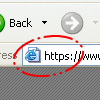 |
look for https:// instead of http:// on the form site
Websites without an encryption method will begin with http://
but sites with encryption will begin with https://. |
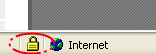
look for a valid SSL certificate
Websites with encryption should have a registered SSL certificate. You can double click on the icon, located at the bottom right-hand corner in Internet Explorer, and find out (a) what the certificate is intended for (b) what site the certificate was issued to (c) who the certificate was issued by (d) when the certificate is valid. Be sure the certificate is not expired. |
 |
Keyloggers, Spyware, Adware, and Viruses
How would your every move on the internet to be tracked? Keyloggers is a program that is installed on your system that can be dangerous to your privacy. Keyloggers keep of log of everything you type, and then sends it to the person who created the particular keylogger.
Spyware is similar, in that it keeps track of everywhere you've been on the internet, and can retrieve files on your computer, gain credit card information; spyware has become very popular in the world of internet hacking.
If you don't like pop-ups, you really won't like adware. Adware is a program that installs itself onto your system and has advertisements pop-up when you're connected to the internet. Adware is annoying to many web visitors, and can also be harmful and dangerous, redirecting users to unwanted sites or loading sites that install programs and viruses onto a user's computer with the user's consent.
Viruses can be deadly to your operating system, and can erase critical information on your computer. Viruses can get to your machine via email attachments, websites, and computer files the have been installed or downloaded.
How to prevent Keyloggers, Spyware, Adware. and Viruses
If you are using Microsoft Windows, you can simply go to www.microsoft.com and click on "Windows Update" to download the latest security updates to help protect your system. These updates are free.
Microsoft recently introduced Windows Defender (beta 2), an update to Windows Anti-Spyware (beta 1). Higgens Online has tested both beta versions, which are a free download from microsoft.com, and both versions have proven to be successful at helping prevent adware, spyware, and viruses infecting our system.
There are many free programs out there that prevent viruses and other malacious software from infecting your computer, but be cautious. Some of the software programs actually install spyware and adware on your system. Download.com is a great resource for free security programs, as well as more effecient programs that are sold at a premium fee.
How to Check a Site's Authenticity
A site's authenticity can be verified by simply visiting http://www.whois.net/, typing in a domain name and looking up that company or person that owns the domain name.
|